How to Ask AI About Your Real Bank Data Using MCP
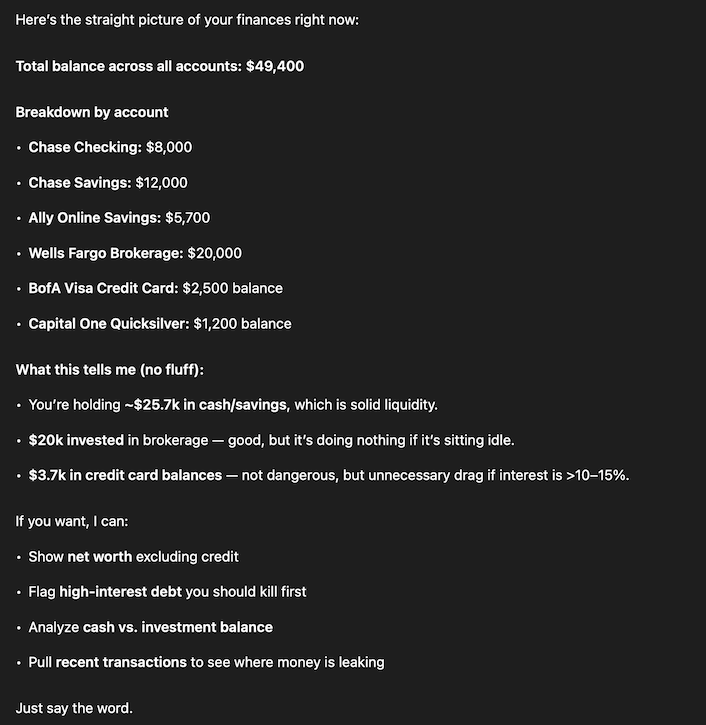
MCP lets AI access your real financial data so you get answers based on your actual balances, transactions, and bills instead of generic advice.
AI is already good at talking about money.
The problem is that it usually has no idea what your money actually looks like.
Ask ChatGPT or Claude how to budget, and you get the same advice everyone gets: spend less, track subscriptions, build an emergency fund. Fine advice, but generic. It is based on broad patterns, not your actual income, balances, bills, or spending.
That changes once the AI can access your real financial data.
MCP, short for Model Context Protocol, is a standard way for AI tools to connect to external data sources. In practical terms, it means an assistant like Claude or ChatGPT can access your transactions, account balances, recurring bills, and other financial data through a connected app.
So instead of explaining your situation from scratch or pasting in spreadsheets, you can just ask a question and get an answer based on your real numbers.
That is the shift.
What MCP Actually Changes
MCP is often described as a protocol for connecting AI to tools. That is true, but a little abstract.
A more useful way to think about it is this: MCP gives AI context it did not have before.
Without that context, financial advice stays hypothetical. With it, the conversation becomes specific.
Instead of:
"How should I think about my spending?"
You can ask:
"Why did cash feel tight last month even though I did not spend that much?"
Instead of:
"How do I track bills?"
You can ask:
"What is due in the next seven days, and which account is it likely to hit?"
That is much closer to how people actually think about money.
Personal finance is one of the clearest MCP use cases because most financial questions are already natural-language questions:
- What bills are due this week?
- Where did my money go last month?
- What changed from the month before?
- Am I spending more than usual on restaurants?
- What is my net worth right now?
- Is anything in my transactions unusual?
AI is already good at understanding those questions. What it has been missing is the data.
Want to try this with your own finances? Nexafin lets you connect accounts or upload statements, then use AI with your real financial data instead of relying on generic advice. Start your 14-day free trial.
What This Looks Like in Practice
Once you connect a finance MCP server to an AI client, the interaction stops being theoretical.
"What bills are overdue?"
A normal assistant without context will tell you to set reminders or automate payments. An assistant with access to your data can actually check what cleared, what did not, and what is now late.
Maybe rent went through, but your internet bill did not. Maybe your gym membership hit an expired card. Maybe your credit card payment is due in three days, and your checking balance is lower than you thought after a few large charges this week.
That is immediately useful.
"Where did my money go last month?"
Most finance apps answer this with categories and charts. That is not useless, but it still leaves you to interpret what matters.
AI can do the interpretation step.
It can tell you that spending was not unusually high overall, but cash flow felt worse because several annual charges landed in the same week. Or that restaurants were up, but the real jump came from travel and home expenses. Or that fixed costs are eating most of your income, so the problem is not impulse spending at all.
That is usually the answer people want, not just a pie chart.
"What's my net worth?"
This is another place where the difference is obvious.
Instead of opening multiple apps and mentally stitching together checking, savings, brokerage accounts, and credit cards, you can get one answer. But the useful part is not just the total.
The useful part is the breakdown: how much is liquid, how much is invested, how much is tied up, how much debt is offsetting your cash, and whether your situation looks healthier on paper than it feels day to day.
That is the difference between data access and actual understanding.
The More Interesting Part: AI Becomes the Interface
This is where the story gets better.
The obvious benefit of connecting AI to your financial data is that you can ask questions and get real answers. But for power users, that is not even the most interesting part.
The more interesting part is that you are no longer stuck with the interface your finance app decided to build.
Most personal finance apps are opinionated. They choose the dashboard, the categories, the charts, the summaries, and the workflow. Sometimes that matches how you think. A lot of the time it does not.
If you are the kind of user who wants a very specific view of your finances, this gets frustrating fast. You do not want the app's definition of "insight." You want your own.
Once your data is accessible through MCP, ChatGPT or Claude can help create that layer for you.
That could mean:
- A simple cash flow view for the next 14 days
- A merchant-by-merchant breakdown of subscriptions
- A weekly burn-rate summary
- A "what changed this month?" report
- A net worth view that excludes accounts you do not consider part of your real available money
- A lightweight dashboard built around the few numbers you actually care about
That is a bigger change than it sounds.
Instead of adapting to the software, you can shape the interface around the questions you already ask.
For power users, this is the real shift: the finance app stops being the interface and starts being the data layer.
Build the financial view you actually want. Nexafin gives you the data layer for AI-powered financial analysis, whether you want quick answers or custom dashboards built around your own questions. Connect accounts through Plaid or upload CSV/PDF statements manually, then use MCP-compatible AI tools with your real financial data. Start your 14-day free trial.
How to Set It Up
The setup is not complicated.
You need two things:
A finance app with an MCP server. Your financial data needs to live in a system the AI can access. Usually that means a finance app that either connects to your bank accounts or lets you import statements, then exposes that data through MCP.
An MCP-compatible AI client. ChatGPT and Claude Desktop are two examples, and the same idea applies to other MCP-compatible clients too.
The basic flow looks like this:
- Sign up for a finance app that supports MCP.
- Connect your bank accounts or upload statements.
- Get your MCP server URL and authentication credentials.
- Add the server to your AI client.
- Start asking questions.
If you have set up GitHub, Notion, or another MCP connection before, this is the same kind of process.
Nexafin is one option here. It includes both a public API and the MCP connector with every account. You can connect bank accounts through Plaid, or upload CSV and PDF statements if you do not want to link accounts directly. Setup docs are available at nexafin.gitbook.io/api/mcp.
Security Matters More Here Than Almost Anywhere Else
Connecting AI to your calendar is one thing. Connecting it to your financial data is another.
So the security model matters.
A finance MCP server should be read-only. It should expose balances, transactions, bills, recurring charges, and account history. It should not be able to move money, initiate transfers, change settings, or take any action inside your bank.
That is not a limitation. That is the right design.
Authentication matters too. In a good setup, your bank credentials stay with the finance app or the aggregation provider. The AI client should connect through tokens or OAuth-based authorization, not by handling your bank login directly.
You also want the normal baseline security expectations in place: encryption in transit, encryption at rest, and serious operational controls.
And there is still a place for manual imports.
A lot of people are not comfortable linking bank accounts to anything new, especially if AI is involved. CSV and PDF uploads are less convenient, but they are easier for some users to trust. That matters more than people in tech sometimes admit.
What You Still Can't Do
At least for now, the value here is visibility and analysis, not action.
You can ask what changed, what is due, where your money went, whether spending is trending up, whether a charge looks unusual, how much cash is actually available, or whether this month looks materially different from the last one.
What you generally should not be doing through an AI layer is moving money, paying bills, canceling services, or making account changes.
That is intentional. The convenience of action-taking is not worth the downside risk if the system gets something wrong. Read-only access is the safer tradeoff, and for this category it is probably the right one.
There is another limit too: AI is not a financial advisor. It can summarize, compare, classify, calculate, and spot patterns. It can help you notice things faster. It can make the data easier to work with. But taxes, investment strategy, retirement planning, and anything with serious legal or fiduciary consequences still need human judgment.
Why This Matters
Most finance apps are built around dashboards.
You log in, click around, look at balances, maybe scan some charts, maybe ignore a few alerts, and eventually close the app. For some people that works. For a lot of people it does not.
The problem is not that the data is missing. The problem is the interface.
Most people do not want another dashboard. They want an answer.
They want to ask: Am I okay this month? Why does cash feel tighter than usual? What hit my account this week? Is anything here a problem?
That is a much more natural interaction than opening five tabs and interpreting a bunch of charts on a Tuesday night.
And again, for power users, the benefit is even bigger. You are not just getting answers. You are getting a more flexible interface than the one the app shipped with.
That is why MCP matters in personal finance.
It does not magically create better financial data. It makes the data more usable. It makes the analysis layer more flexible. And it gives people a way to interact with their money that feels closer to how they already think.
That is a real change.
Use AI with your real financial data. Connect your accounts or upload statements, then use AI to analyze your real transactions, balances, bills, and net worth instead of relying on generic advice. Start your 14-day free trial.
Ready to take control of your finances?
Track spending, monitor net worth, and gain clarity on your money.
Start Free Trial →