Import Bank & Credit Card Statements: Nexafin Finds Your Bills Automatically
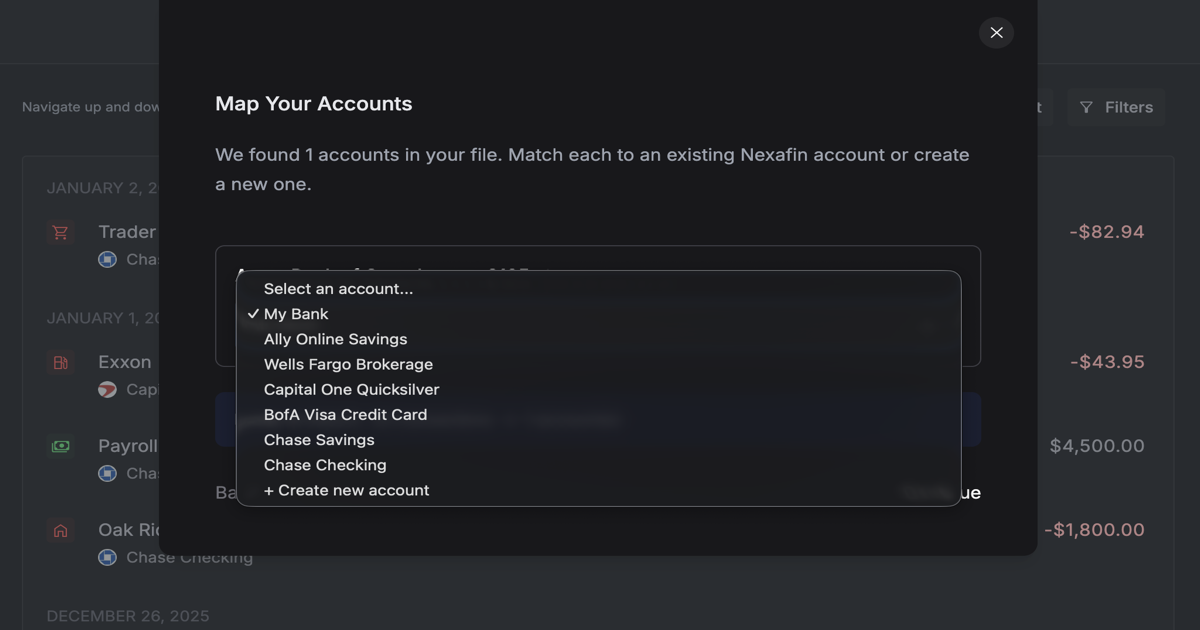
Upload your PDF statements. Nexafin extracts every transaction and flags recurring charges as bills. No manual entry, no missed subscriptions.
You have years of bank statements sitting in your email. PDFs from every credit card, every checking account, every monthly cycle. All that financial history, completely useless unless you want to type it in manually.
Nobody wants to do that.
What If You Could Just Upload Them?
Nexafin reads your bank and credit card statements. Drop in a PDF, and the system extracts every transaction automatically. Dates, descriptions, amounts, all pulled out and ready to categorize.
No manual data entry. No copy-pasting into spreadsheets. Just upload and go.
Credit Card Statements Reveal More Than Transactions
Here's where it gets interesting.
When you upload a credit card statement, Nexafin doesn't just import the transactions. It scans for recurring charges (subscriptions, memberships, services billing you every month) and flags them as bills.
That $12.99 you forgot about? Found. The annual fee that renewed last month? Caught. The streaming service you meant to cancel six months ago? Now you'll see it.
Bill detection works automatically. You don't need to tag anything or set up rules. Nexafin recognizes the patterns and surfaces them for you.
What You Can Import
- Bank statements: Checking, savings, any account that sends monthly PDFs
- Credit card statements: Visa, Mastercard, Amex, store cards. If it's a PDF, it works
- Multi-page statements: Three pages or thirty, Nexafin processes the whole document
Most major bank and credit card formats are supported. The system adapts to different layouts and statement styles.
How It Works
Step 1: Find your statements
Check your email. Most banks and credit cards send monthly PDFs, or you can download them from your online account. Grab a few months' worth to start.
Step 2: Upload to Nexafin
Head to the Transactions page and click Import. Select your PDF or drag and drop it directly.
Nexafin parses the document and extracts every transaction it finds.
Step 3: Review and confirm
You'll see a preview of the extracted transactions before anything is imported. Check that the dates, amounts, and descriptions look right. Make any adjustments if needed.
Hit confirm. Transactions import, auto-categorization runs, and any recurring charges get flagged as bills.
Why This Matters
Onboarding without bank linking: Don't want to connect your accounts through Plaid? Upload statements instead. You get the same visibility without granting third-party access.
Historical data import: Bank connections only sync recent transactions. PDF import lets you bring in months or years of history. See your full financial picture, not just the last 90 days.
Catch hidden subscriptions: Credit card statements are where subscriptions hide. You approved them once, forgot about them, and now they bill quietly every month. PDF import with bill detection drags them into the light.
Works with any bank: If your bank sends statements, Nexafin can read them. No integration required, no waiting for support, no "your bank isn't available" messages.
When to Use PDF Import vs. Bank Connection
Choose PDF Import If... Choose Bank Connection If... You want to import historical data You only need recent transactions You prefer not to link accounts Automatic syncing matters most Your bank isn't supported for linking Your bank connects reliably You want to scan for hidden subscriptions You already track bills elsewhereYou can use both. Connect what you're comfortable connecting, import the rest as PDFs. You can also import CSV or Excel files if your bank provides those formats. Nexafin merges everything into one view.
The Honest Tradeoff
PDF import isn't real-time. You'll need to download statements periodically and upload them: monthly, when your statement arrives, or whenever you want to update your history.
But for many users, that's the point. Full control. No ongoing bank access. Import when you want, on your terms.
And the bill detection? That runs automatically every time.
Stop Ignoring Your Statements
Those PDFs in your inbox aren't just clutter. They're a complete record of where your money went. Nexafin turns them into something useful: organized transactions, visible spending patterns, and bills you didn't know you were still paying.
Upload your first statement and see what you find.
Ready to take control of your finances?
Track spending, monitor net worth, and gain clarity on your money.
Start Free Trial →